NFR The Windows 11 Exodus - An Evan "tech help" rant

Non-fishing related
I can’t believe they axed the Snippet Tool in Windows 11. I used that every day all the time at work. It can take a screen shot and paste it in one move into an email. Great for making emails with imbedded images of spreadsheets, portions of photos, all that stuff. It’s really annoying because I can’t understand why they would remove such a simple and useful application other than for nefarious reasons. I know there are other ways to do this but the old way was seamless and easy for what I do.
If it works well it must be eliminated or bloated with AI/Adware.

Microsoft developer.....probably
 
I can’t believe they axed the Snippet Tool in Windows 11. I used that every day all the time at work. It can take a screen shot and paste it in one move into an email. Great for making emails with imbedded images of spreadsheets, portions of photos, all that stuff. It’s really annoying because I can’t understand why they would remove such a simple and useful application other than for nefarious reasons. I know there are other ways to do this but the old way was seamless and easy for what I do.
I hear ya. I used to use the Snipping Tool, and an even better 3rd party app called Snag-it, to create system and user documentation where screenshots were necessary. I'd definitely miss those. However, the Snipping Tool should be part of Windows 11:

(https://www.bing.com/ck/a?!&&p=3daf...hYzlmZi00YTU4LTI0YzktMzI1My1mMTJiYWM5ZjlkNDQ_

Perhaps it's not installed, or the shortcut has been removed. You could also try the hotkey combo of Windows key + Shift + S to see if it starts that way. Otherwise, I'd see if you can add it through Add or remove programs.

Good luck.
 
If you don't require Windows for work, I see no reason to use it anymore. Most all programs can be run from a Linux machine either natively or through a Virtual Machine (or with Wine, which helps some programs run natively). Only major programs I can think of that don't run on Linux, which is a deliberate thing from the companies that own them, are anything Adobe or Intuit. but running both in a Windows virtual machine is super easy and works great. I use Turbotax Business within a Virtual Machine that runs Windows 11. Otherwise, I don't have any need for Windows.

Just about any program out there has a free open source equivalent that's easy to find. Heck, even Adobe Illustrator, which I used a TON in the past, has its "equivalent" Inkscape which I'm using at this very moment to do some logo work for my day job. Even after almost 2 decades of using Illustrator, the transition to Inkscape was suuuuuper easy and familiar-feeling.

All sounds complicated, but is so much simpler than it sounds. I'm just bringing this all up now because I know how much loathing has been going on with Windows 11 lately. There is a better way!
 
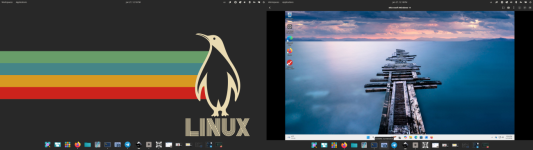
Example of what I'm talking about. Left screen is Linux, right screen is my "virtual machine" windows 11 I pop up any time I HAVE to have Windows (which is like once a year). I literally just open up the virtual machine program, select my "windows 11" virtual machine button, and it opens it right up. Setup only took a few minutes the first time.

1769545128784.png
 
I hear ya. I used to use the Snipping Tool, and an even better 3rd party app called Snag-it, to create system and user documentation where screenshots were necessary. I'd definitely miss those. However, the Snipping Tool should be part of Windows 11:

(https://www.bing.com/ck/a?!&&p=3daf...hYzlmZi00YTU4LTI0YzktMzI1My1mMTJiYWM5ZjlkNDQ_

Perhaps it's not installed, or the shortcut has been removed. You could also try the hotkey combo of Windows key + Shift + S to see if it starts that way. Otherwise, I'd see if you can add it through Add or remove programs.

Good luck.
On Windows 11 Windows key + Shift + S still works. I prefer just to hit the <Print Screen> button. Takes me directly to Snippit or some variation of it...
 
Setup the new laptop this morning. A little annoyed at the one hour or so the thing took to update itself on initial startup. After that it took me about another hour to install my apps, setup the interface the way I like it. Got rid of mcafee. The system found my printers and presented them. All in all pretty straightforward.

Interface seems pretty clean. I don’t seem to have any issues finding and using the stuff I use. Don’t know what all the problem is with 11. Just another os that takes a few minutes to get use to.
 
Setup the new laptop this morning. A little annoyed at the one hour or so the thing took to update itself on initial startup. After that it took me about another hour to install my apps, setup the interface the way I like it. Got rid of mcafee. The system found my printers and presented them. All in all pretty straightforward.

Interface seems pretty clean. I don’t seem to have any issues finding and using the stuff I use. Don’t know what all the problem is with 11. Just another os that takes a few minutes to get use to.
Maybe I should bring my new laptop over to your house . . .
 
Setup the new laptop this morning. A little annoyed at the one hour or so the thing took to update itself on initial startup. After that it took me about another hour to install my apps, setup the interface the way I like it. Got rid of mcafee. The system found my printers and presented them. All in all pretty straightforward.

Interface seems pretty clean. I don’t seem to have any issues finding and using the stuff I use. Don’t know what all the problem is with 11. Just another os that takes a few minutes to get use to.
It's not about interface so much as it forcing updates and having it break a lot of the things you set up when it does. Then when you opt out of or turn certain spy features off, it turns them back on and doesn't tell you. Then the long list of performance issues unless you have new hardware.
 
Last edited:
  • Like
Reactions: RCF
Another super irritating thing with it: Before the days of Windows 11, I used to be able to have a dual boot system running on the same hard drive. I'd have one partition for Windows, and one partition for Linux. I could switch back and forth between them.

Enter Windows 11 - when I updated to Windows 11 back in like.. 2022 I think? I totally broke my dual-boot system. Windows suddenly, and apparently deliberately, would corrupt bootloader files for any other operating systems it could detect. Super dumb and unnecessary, but could get around that with just running a separate hard drive, which I did. That got the job done.

Now, with a relatively recent update, I can no longer even do that. At least without having to go in and remove my main solidstate hard drive with my Linux install. So Windows 11 is back to doing the same thing and not wanting to share a machine with anyone but itself.

So now, I have a second hard drive I am no longer using because Windows doesn't want to play nice, so it got wiped. But since the ONLY thing I use Windows for is Turbotax Business (for PNWFF), I can just run it on a contained Virtual Machine within Linux (which I posted about earlier).

Still, it's aggravating and unnecessary.
 
Another super irritating thing with it: Before the days of Windows 11, I used to be able to have a dual boot system running on the same hard drive. I'd have one partition for Windows, and one partition for Linux. I could switch back and forth between them.

Enter Windows 11 - when I updated to Windows 11 back in like.. 2022 I think? I totally broke my dual-boot system. Windows suddenly, and apparently deliberately, would corrupt bootloader files for any other operating systems it could detect. Super dumb and unnecessary, but could get around that with just running a separate hard drive, which I did. That got the job done.

Now, with a relatively recent update, I can no longer even do that. At least without having to go in and remove my main solidstate hard drive with my Linux install. So Windows 11 is back to doing the same thing and not wanting to share a machine with anyone but itself.

So now, I have a second hard drive I am no longer using because Windows doesn't want to play nice, so it got wiped. But since the ONLY thing I use Windows for is Turbotax Business (for PNWFF), I can just run it on a contained Virtual Machine within Linux (which I posted about earlier).

Still, it's aggravating and unnecessary.

Are there no alternatives to TurboTax that run on Linux?
 
Are there no alternatives to TurboTax that run on Linux?
Browser-based turbotax. It's just more expensive. By like a lot. There also other online alternatives. For business though, it's tough to beat turbotax desktop.
 
It's not about interface so much as it forcing updates and having it break a lot of the things you set up when it does. Then when you opt out of or turn certain spy features off, it turns them back on and doesn't tell you. Then the long list of performance issues unless you have new hardware.
I guess I’m in for a ride.

I worked as a network manager for over 25 years. I can’t remember how many os upgrades I’ve seen and or implemented. Everyone of them had issues. Many issues were the same ones mentioned. I just don’t care anymore. My apps work. My printers work. I’m not doing anything that someone at mickeysoft or anyone else is going to be that interested in. My banking and investment apps run on a separate system that can’t be seen from outside my personal network. Most of the criticisms I hear seemed to be rooted in some sort of dislike for mickeysoft. I get it. After working with google at a corporate level I learned to absolutely hate them and will purposely go out of my way to avoid anything they make.
 
I guess I’m in for a ride.

I worked as a network manager for over 25 years. I can’t remember how many os upgrades I’ve seen and or implemented. Everyone of them had issues. Many issues were the same ones mentioned. I just don’t care anymore. My apps work. My printers work. I’m not doing anything that someone at mickeysoft or anyone else is going to be that interested in. My banking and investment apps run on a separate system that can’t be seen from outside my personal network. Most of the criticisms I hear seemed to be rooted in some sort of dislike for mickeysoft. I get it. After working with google at a corporate level I learned to absolutely hate them and will purposely go out of my way to avoid anything they make.
Valid. I have been outside their ecosystem for long enough that I have zero desire to go back in. I get frustrated enough just using it a few times a year. but yeah, it does work for most people. I'm just looking for a fight 😂
 
When I was working in Forest Planning I was always frustrated with the amount of time I spent on network, operating systems, and other issues not directly related to what I needed to do with the computers.

If you do something often or need to process large amounts of data computers are wonderful.

My frustration, was that I would need to run many economic programs maybe once a year when a specific issue needed to be addressed. At which point I was basically relearning how to run the program EVERY TIME I used it. That was really stressful.

I am hopeful, that with AI doing analysis will be much simpler.

Since I retired outside my hobbies, I refuse to use my computers for anything that I do not do on at least a monthly basis.

It seems all the companies that want my business also want me to work for them at no pay entering data into their systems.
 
Setup the new laptop this morning. A little annoyed at the one hour or so the thing took to update itself on initial startup. After that it took me about another hour to install my apps, setup the interface the way I like it. Got rid of mcafee. The system found my printers and presented them. All in all pretty straightforward.

Interface seems pretty clean. I don’t seem to have any issues finding and using the stuff I use. Don’t know what all the problem is with 11. Just another os that takes a few minutes to get use to.
I'm the same way and have used Windows 2.0 and up. Windows always has some bloat, kind of like me, FlyBill! LOL!

Being that I've used and the Office Suite of apps and developer tools, I just stick with it. I have learned the Mac OS very well and already knew Linux, although recently I added Ubuntu on my Samsung Laptop and forgot how much I love the command interface. I've been doing this a long time. I've also used Unix, on a Spark workstation and other places back in the day. My uncle was a cartographer and playing around with ArcGIS was always fun. If I had it to do all over again I would probably stick with ArcGIS and large DB work.. not too late I guess!
 
Made the jump to Linux.........bye, bye Windows.
 
Thanks, @Evan B, for pushing me down the rabbit hole. :cautious:

Many years ago, I set up and used Linux for work (mail transfer, server/networking and security tools, etc.) and also played with it at home. I found that I was able to do the hard things with Linux, but found it very frustrating to use as a client OS at home because it made the simplest of things (like printing) hard. I eventually gave up on Linux ...until you suggested Pop_OS!

So, I installed Pop_OS with the intention of using it as a media server to stream/play my FLAC audio files. Well, that got out of hand. Now, I have:
  1. Installed it on a 10-year-old desktop and, of course, had to upgrade the RAM.
  2. Installed two old 1TB laptop drives and partitioned/formatted them.
  3. Copied over all my FLAC files and installed a player app to play them on the secondary stereo in my addition.
  4. Installed a software package to manage and organize the files and metadata.
  5. Set up media sharing so that I can access the FLAC files on my main A/V receiver and SmartTVs via DLNA. I can now sit on my couch and play any of my audio files on my main stereo by simply using the A/V receiver's remote control.
I still need to:
  1. Set up SMB file sharing so I can use the new 1TB drives for reading and writing files to/from our Windows laptops.
  2. Set up automated file backups on those laptops to create backups on those file shares.
  3. Once I find them, copy all of our family home video files to those shares for viewing on our SmartTVs.
  4. Install some CD Ripping software and use the Linux desktop instead of my Windows laptop to rip CDs.
  5. Maybe explore Plex or Rune if I feel like getting a subscription.
  6. More shit as it pops into my mind.
Besides breaking the COSMIC desktop twice (after installing updates), it was very stable and easy to set up and use. Everything else worked, including adding those new disk drives. I reverted to a simpler GNOME desktop that works, and I actually like it better for a purpose-built machine like this.

Basically, it only cost me $15 for some ebay RAM modules. It's been fun to play with and turning out to be a useful appliance. So, thanks again for sending me into the abyss.

 
Thanks, @Evan B, for pushing me down the rabbit hole. :cautious:

Many years ago, I set up and used Linux for work (mail transfer, server/networking and security tools, etc.) and also played with it at home. I found that I was able to do the hard things with Linux, but found it very frustrating to use as a client OS at home because it made the simplest of things (like printing) hard. I eventually gave up on Linux ...until you suggested Pop_OS!

So, I installed Pop_OS with the intention of using it as a media server to stream/play my FLAC audio files. Well, that got out of hand. Now, I have:
  1. Installed it on a 10-year-old desktop and, of course, had to upgrade the RAM.
  2. Installed two old 1TB laptop drives and partitioned/formatted them.
  3. Copied over all my FLAC files and installed a player app to play them on the secondary stereo in my addition.
  4. Installed a software package to manage and organize the files and metadata.
  5. Set up media sharing so that I can access the FLAC files on my main A/V receiver and SmartTVs via DLNA. I can now sit on my couch and play any of my audio files on my main stereo by simply using the A/V receiver's remote control.
I still need to:
  1. Set up SMB file sharing so I can use the new 1TB drives for reading and writing files to/from our Windows laptops.
  2. Set up automated file backups on those laptops to create backups on those file shares.
  3. Once I find them, copy all of our family home video files to those shares for viewing on our SmartTVs.
  4. Install some CD Ripping software and use the Linux desktop instead of my Windows laptop to rip CDs.
  5. Maybe explore Plex or Rune if I feel like getting a subscription.
  6. More shit as it pops into my mind.
Besides breaking the COSMIC desktop twice (after installing updates), it was very stable and easy to set up and use. Everything else worked, including adding those new disk drives. I reverted to a simpler GNOME desktop that works, and I actually like it better for a purpose-built machine like this.

Basically, it only cost me $15 for some ebay RAM modules. It's been fun to play with and turning out to be a useful appliance. So, thanks again for sending me into the abyss.
Yeah Cosmic is still new and has a few kinks. Can't go wrong with Gnome though.
 
Browser-based turbotax. It's just more expensive. By like a lot. There also other online alternatives. For business though, it's tough to beat turbotax desktop.
i used to use turbo tax. back in.... 2008, i took a $ buyout, and did an early retirement. i always did my taxes on turbo tax. that yr, turbo said i was eligible for an alternative minimum tax carry forward. or something close to that. anyways, i did, and then did it for years - and kept doing it when i let an acct friend do my taxes. turns out, the 2nd yr i put the alt min carry forward in the wrong place. turbo did not object. i saved $, and was oblivious. then got irs audited in like 2018, and had to pay $ to expert tax person, and then paid for 2 yrs tax underpayment... ugh
anyways. turbo let me put #'s in the wrong place, and accepted it, and let me submit to irs.
 
Back
Top