NFR The Windows 11 Exodus - An Evan "tech help" rant

Non-fishing related
My pet peeve is Adobe PDF. Bloated, buggy, runs slow, crashes. But I use PDFs a LOT at work-- combining them, OCR for text searching, inserting text, etc. every day. I've used Adobe PDF Pro for years.

I've tried Adobe replacements but they all seem to lack the tools I need. Any recommendations?
 
My pet peeve is Adobe PDF. Bloated, buggy, runs slow, crashes. But I use PDFs a LOT at work-- combining them, OCR for text searching, inserting text, etc. every day. I've used Adobe PDF Pro for years.

I've tried Adobe replacements but they all seem to lack the tools I need. Any recommendations?

You might give OmniPage Ultimate a free trial to see if it would meet your needs.
SF
 
My pet peeve is Adobe PDF. Bloated, buggy, runs slow, crashes. But I use PDFs a LOT at work-- combining them, OCR for text searching, inserting text, etc. every day. I've used Adobe PDF Pro for years.

I've tried Adobe replacements but they all seem to lack the tools I need. Any recommendations?

Retire! Worked for me. 😁
 
Windows 11:

1769407589213.png
 
While I believe the above post is accurate, I do believe there is a better path forward....

I have been supporting six computers for the last 35 years; kids, family and in-laws. Things have certainly changed! Yet I continue to try the best I can.

I fully agree with the advice above deleting virus and malware protection software, etc. immediately. I also delete all games on my phone. I also delete any social media software on any computer/phone I have. If I do not need it ---> zap!

Our population is getting older (duh), they also do not have the requisite skills e.g. programming, networking, tailoring OS capabilities, nor debugging issues, much less know how to configure the capabilities of numerous 'switches/settings' in so many places on a laptop or phone? Many of us retired from that and do no not want to be associated with it any longer. I sure do not and I am somewhat technically attune. How many seniors even know about the 'three finger salute' or pressing the power button for 10+ seconds to reboot a computer?

Today I had to remove the battery so I could fix an issue on my wife's laptop ---> Bit Locker. WTF is that!?

IMHO, I believe the economic/business/financial model by Microsoft, Google, Facebook, and social networking sites are seriously flawed. They make money accepting funds from serious and nefarious scam sites to advertise. They sell our personal data to them and others knowingly without our permission.

We should pay for what we want and use. We pay for insurance that we want; automobile, homeowners/rental, flood, fire, earthquake, etc. Coverages vary based on what we want. Why not software?

I want to pay and will pay for a stable, safe, easy to update, reliable, consistent user interface, that works! If I want Word or Excel, I will pay for that (already do). If I want PowerPoint, charge me. If I want OutLook (heaven forbid) ---> charge me for it. If I want Gmail and Calendar - charge me for it. I can not use updating my Calendar and syncing with my phone. If I go to MyChart, it may or may not update my calendar on my laptop. Works every time I use my phone...

I do not need to use "bloatware'! If I needed that capability, e.g. Excel, I will pay for it!

If I want AI ---> charge me for that! I do not need Gmail to summarize all related emails. If I want to know ---> use the Search function. When was the last time you used the Search function? LOL!

Make it easy to change what I want. If I want AI, one button to ' Turn-on AI'. Make the default No on updates, not what the company wants ---> some YES by default and other capabilities NO by default.

 
While I believe the above post is accurate, I do believe there is a better path forward....

I have been supporting six computers for the last 35 years; kids, family and in-laws. Things have certainly changed! Yet I continue to try the best I can.

I fully agree with the advice above deleting virus and malware protection software, etc. immediately. I also delete all games on my phone. I also delete any social media software on any computer/phone I have. If I do not need it ---> zap!

Our population is getting older (duh), they also do not have the requisite skills e.g. programming, networking, tailoring OS capabilities, nor debugging issues, much less know how to configure the capabilities of numerous 'switches/settings' in so many places on a laptop or phone? Many of us retired from that and do no not want to be associated with it any longer. I sure do not and I am somewhat technically attune. How many seniors even know about the 'three finger salute' or pressing the power button for 10+ seconds to reboot a computer?

Today I had to remove the battery so I could fix an issue on my wife's laptop ---> Bit Locker. WTF is that!?

IMHO, I believe the economic/business/financial model by Microsoft, Google, Facebook, and social networking sites are seriously flawed. They make money accepting funds from serious and nefarious scam sites to advertise. They sell our personal data to them and others knowingly without our permission.

We should pay for what we want and use. We pay for insurance that we want; automobile, homeowners/rental, flood, fire, earthquake, etc. Coverages vary based on what we want. Why not software?

I want to pay and will pay for a stable, safe, easy to update, reliable, consistent user interface, that works! If I want Word or Excel, I will pay for that (already do). If I want PowerPoint, charge me. If I want OutLook (heaven forbid) ---> charge me for it. If I want Gmail and Calendar - charge me for it. I can not use updating my Calendar and syncing with my phone. If I go to MyChart, it may or may not update my calendar on my laptop. Works every time I use my phone...

I do not need to use "bloatware'! If I needed that capability, e.g. Excel, I will pay for it!

If I want AI ---> charge me for that! I do not need Gmail to summarize all related emails. If I want to know ---> use the Search function. When was the last time you used the Search function? LOL!

Make it easy to change what I want. If I want AI, one button to ' Turn-on AI'. Make the default No on updates, not what the company wants ---> some YES by default and other capabilities NO by default.
That's not the way tech companies work now, nor are they going to change. Too much money and power in the "new" way. Thus my subtle nudge for us as consumers to make a statement and leave their ecosystems.
 
My pet peeve is Adobe PDF. Bloated, buggy, runs slow, crashes. But I use PDFs a LOT at work-- combining them, OCR for text searching, inserting text, etc. every day. I've used Adobe PDF Pro for years.

I've tried Adobe replacements but they all seem to lack the tools I need. Any recommendations?
I use PDFs a ton and haven't touched Acrobat in years. I'm admittedly not well-versed in the programs available on Windows, at least not first-hand. But PDFgear is supposed to be quite good. I've heard PDF-XChange Editor is also excellent.
 
  • Like
Reactions: Zak
I recently bought a new laptop computer. It has Windows 11. I had to replace an obsolete notebook computer and tablet.

About a week ago my You Tube feed gave me a Windows tech geek guy who suggests and provides instructions for deleting or disabling about 10 things in Windows 11 to make it run better and deprive Microsoft of personal information. I bookmarked it and think I can do it. Even my old desktop after a recent Firefox update, has the main page plastered with news story and other ads that I don't want, same as on my laptop main screen. If I follow the geek's instructions, those are all supposed to go away. I wouldn't mind trying Linux, but that stuff is above my computer literacy grade.
 
I recently bought a new laptop computer. It has Windows 11. I had to replace an obsolete notebook computer and tablet.

About a week ago my You Tube feed gave me a Windows tech geek guy who suggests and provides instructions for deleting or disabling about 10 things in Windows 11 to make it run better and deprive Microsoft of personal information. I bookmarked it and think I can do it. Even my old desktop after a recent Firefox update, has the main page plastered with news story and other ads that I don't want, same as on my laptop main screen. If I follow the geek's instructions, those are all supposed to go away. I wouldn't mind trying Linux, but that stuff is above my computer literacy grade.
Once Linux is set up, it's much simpler and less headache (most distros at least). There's another board member I'm helping switch over actually, so maybe he can give a "non-Evan" opinion if we complete the task.

The issue with anything like this with Windows is that you can do all that, but they'll force an update to make you have to do it all over again, or will move/change things so you can't find it in the same place. I could rant a long time on that topic (especially on how Windows sabotages installations when there's more than one operating system on your machine, even if they're isolated on separate physical hard drives.
 
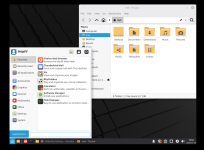
A forum member here has a couple older computers and was asking me about a Linux switch. I put together a lightweight distro with a minimalist desktop environment and am testing it on my computer in a contained "virtual machine" where I can test it with his specs. As you can tell, the desktop looks nothing like mine, but more like an oldschool Windows. Kinda fun to customize things to make it do what you want.

1769460785407.png
 
With a computer these days the main advice is you gotta stay relevant in the Computer Internet Scene if you want to be taken serously in these INTERNET COMMENT SECTIONS.

Thus the main idea is to Hire OUt for one of these high end computer system teams you see advertising on Craigslist (amd other Internet locations). Generally the higher the fee the more Trustworthy the work is. Just Pay Big to a INTERNET GROUP to maintain your relevancy in the Computer Scene.
 
My pet peeve is Adobe PDF. Bloated, buggy, runs slow, crashes. But I use PDFs a LOT at work-- combining them, OCR for text searching, inserting text, etc. every day. I've used Adobe PDF Pro for years.

I've tried Adobe replacements but they all seem to lack the tools I need. Any recommendations?
Xodo
 
  • Like
Reactions: Zak
I will be playing the win 11 game soon having just ordered a new laptop. I’m not very concerned about it. The new system will primarily be used for one purpose, photo/video editing and printing. For almost everything else I use an iPad. On the iPad are two financial apps. One is my everyday bank and the other is for investment/retirement accounts. I use my phone as a phone and sometimes for gps/directions purposes.
 
I fully hate windows 11 and Microsoft since anything after 7. 11 is a complete piece of shit. Deletion of a simple file is time consuming and the fan on the machine never stops. This will be what makes me move to a Linux system. Why do some companies have the ability to innovate, get a great product, then proceed to completely wreck it along with any credibility they once had. If the headquarters in Redmond have a Unibomber incident don't look over here. I was in Brazil.
 
I can’t believe they axed the Snippet Tool in Windows 11. I used that every day all the time at work. It can take a screen shot and paste it in one move into an email. Great for making emails with imbedded images of spreadsheets, portions of photos, all that stuff. It’s really annoying because I can’t understand why they would remove such a simple and useful application other than for nefarious reasons. I know there are other ways to do this but the old way was seamless and easy for what I do.
 
I used to build tide tables for the Oregon City area. NOAA had a gauge at the Morrison Bridge in downtown Portland; it was the last one upriver on the Willamette River. The program was called Publisher, went away with Windows 10, so did the tide tables.
 
I used to build tide tables for the Oregon City area. NOAA had a gauge at the Morrison Bridge in downtown Portland; it was the last one upriver on the Willamette River. The program was called Publisher, went away with Windows 10, so did the tide tables.
There are open source options for programs that do the same job. Closest to Publisher would be Libre Office Draw: https://www.libreoffice.org/discover/draw/

I personally do all my graphics work in Inkscape, but that's likely overkill for that particular use.
 
Back
Top