
Navigation
Install the app
How to install the app on iOS
Follow along with the video below to see how to install our site as a web app on your home screen.
Note: This feature may not be available in some browsers.
More options
Style variation
You are using an out of date browser. It may not display this or other websites correctly.
You should upgrade or use an alternative browser.
You should upgrade or use an alternative browser.
New Laptop
- Thread starter Mossback
- Start date

I use a work issued Dell that I use when I work from home and it has worked fine.
I did buy a 27” monitor and added a wireless keyboard and mouse. Didn’t really need the keyboard and mouse, but the big monitor is sure nice with my old eyes.
I’ll buy myself a laptop to replace my work issued one when I retire.
SF
I did buy a 27” monitor and added a wireless keyboard and mouse. Didn’t really need the keyboard and mouse, but the big monitor is sure nice with my old eyes.
I’ll buy myself a laptop to replace my work issued one when I retire.
SF

Enjoy the latest Windows OS and all the changes to it's interface and changes to applications that run on it. Complex and counterintuitive to say the least... The cloud makes it less private and IMHO less secure and more expensive. Default settings need to be completely understood/accepted.
Windows12 will be released shortly. Make sure your hardware is compatible. May be worth waiting until it is released because it will cost you $150+ to upgrade to the new OS.
Windows12 will be released shortly. Make sure your hardware is compatible. May be worth waiting until it is released because it will cost you $150+ to upgrade to the new OS.
I use a work issued Dell that I use when I work from home and it has worked fine.
I did buy a 27” monitor and added a wireless keyboard and mouse. Didn’t really need the keyboard and mouse, but the big monitor is sure nice with my old eyes.
I’ll buy myself a laptop to replace my work issued one when I retire.
SF
I just bought a new Dell laptop with a 27" monitor. Luv it! It replaced a 8 year old Dell laptop that was out of date.

Which Dell ?I just bought a new Dell laptop with a 27" monitor. Luv it! It replaced a 8 year old Dell laptop that was out of date.
That was my last laptop maker, was pleased generally.

I’ve always purchased the best Intel processor I am willing to afford, which is alway a model or 2 removed from the latest and greatest. I haven’t had any bad experiences with other manufacturers, but years ago a programmer friend swore by them and they haven’t let me down. The other components (if you aren’t gaming) can be easily and inexpensively added internally or externally as needed.
Also - if you have the space, go ultra wide on your monitor. There is a free program called wingrid - absolute game changer.
Also - if you have the space, go ultra wide on your monitor. There is a free program called wingrid - absolute game changer.
My laptop:

with a monitor:
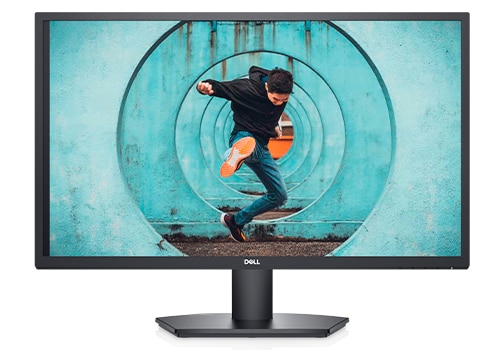
Black Friday specials applied so could not pass it up...
Not touch screen, but I am old school, mouse is just fine. Wireless mouse and key board may sound great but IMHO expensive due to batteries and also a security risk due to Bluetooth transmission.
Dell Inspiron 15 3520 Laptop | Dell USA
Alienware m16 R2 Gaming Laptop with Intel Core Ultra processors, RTX 40 Series Laptop GPUs, and Cryo-tech cooling.
www.dell.com
with a monitor:
Dell 27 FHD Computer Monitor - SE2722H | Dell USA
Upgrade your viewing experience with 27 inch SE2722H FHD slim-bezel VA panel monitor featuring AMD FreeSync and 75Hz refresh rate for leisure gaming.
www.dell.com
Black Friday specials applied so could not pass it up...
Not touch screen, but I am old school, mouse is just fine. Wireless mouse and key board may sound great but IMHO expensive due to batteries and also a security risk due to Bluetooth transmission.

I have an ultra light Samsung laptop that I love! Bought it about a year ago when my Surface 3.5 pro died. The Surface was good but the Samsung rocks. Have had a few HP laptops that were older and heavy. Go to.Costco and Best Buy and check things out. You don't need bleeding edge bit look at good processors and really focus on the screens and clarity and colors. Crispness is probably a better term. Buy one within your budget and don't over think it. My opinion for.what its worth. Don't get the warranty, it's wasted money imho!
I have an ultra light Samsung laptop that I love! Bought it about a year ago when my Surface 3.5 pro died. The Surface was good but the Samsung rocks. Have had a few HP laptops that were older and heavy. Go to.Costco and Best Buy and check things out. You don't need bleeding edge bit look at good processors and really focus on the screens and clarity and colors. Crispness is probably a better term. Buy one within your budget and don't over think it. My opinion for.what its worth. Don't get the warranty, it's wasted money imho!
Computers are now just a consumable (throw-away) item. 3 years and they have been superseded by new technology and software requirements. Buy the latest, 3 years, maybe 4. Buy one with older technology (processor) - 3 years and is less expensive. Built in obsolescence...
The next generation will be built with processors with AI technology processing. Do not worry ---> it will be smarter than you or me...
Last edited:

Lenovo Thinkpad. Very sturdy and professional. I've been using one model or another for about 20 years.
One of them had a touch screen, but I never used it.
Don't get a graphics card if you are not buying a gaming laptop, it just runs hot and runs the fan, making it noisy.
One of them had a touch screen, but I never used it.
Don't get a graphics card if you are not buying a gaming laptop, it just runs hot and runs the fan, making it noisy.

I've long been a fan of the HP Pavilion series laptops. Never any issues and they last a long time. Great for email and PNWFF browsing, enough juice to run CAD and ESRI GIS software. Never had a touch screen, but my grandson reaches for it, the kids in grade school have it. I use a mouse, easiest way to work with the software I use.


Windows 11 sent me to using Linux full time. Not because I'm some uber nerd like Linux used to be for, but because it's now the easiest to get up and running the way I want it to. It's also what I set less savvy family members up on when they have me help them. It's just too good not to these days if you know which distros to use. (and I can help anyone here who's fed up with the new Windows, just shoot me a PM or we can start another thread).Enjoy the latest Windows OS and all the changes to it's interface and changes to applications that run on it. Complex and counterintuitive to say the least... The cloud makes it less private and IMHO less secure and more expensive. Default settings need to be completely understood/accepted.
Windows12 will be released shortly. Make sure your hardware is compatible. May be worth waiting until it is released because it will cost you $150+ to upgrade to the new OS.
For laptops, I'm a big fan of the Lenovos, especially the ThinkPads. After using quite a few different things and doing a ton of research, they're what I landed on with no close second place. The specific model will depend on your needs, but there's a lot of great options.
Lenovo ThinkPad: Business Laptops Designed for Performance
Looking for top-notch business laptops? Check out Lenovo ThinkPad laptops and enjoy exclusive offers. Join MyLenovoRewards for more rewards and savings.
www.lenovo.com


Why?
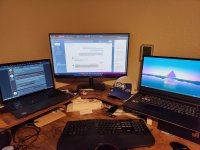
Left laptop for personal stuff, middle one is work (remote desktop to the server at my boss's place) - one on the right is for media (plays music, or videos, or any other things to break the silence while I'm working). The one on the right is kind of excess, but it's my previous laptop I replaced with the one on the left, so just turned it in to a media player so I can have things playing uninterrupted while I work on the other two.Why?

I figured you moderated the board with your left hand, did your day job by hunt and pecking with your nose in the middle, and trade crypto on the right. Simultaneously. The facade has been cracked!Left laptop for personal stuff, middle one is work (remote desktop to the server at my boss's place) - one on the right is for media (plays music, or videos, or any other things to break the silence while I'm working). The one on the right is kind of excess, but it's my previous laptop I replaced with the one on the left, so just turned it in to a media player so I can have things playing uninterrupted while I work on the other two.
I still use a massive desktop in my mancave that has all my business stuff and various drives for various things. It gets new components every 4-5 years and is about to get an upgrade next year. A laptop for the couch and to connect to the big screen for nefarious streams.
When the wife was working they gave her a laptop and two huge monitors. She would have a mouse for each hand and a split keyboard like yours. A real wizard with the company software but helpless in real world computing. I had to show her how to check email, do google searches, create and save documents, etc.
When the wife was working they gave her a laptop and two huge monitors. She would have a mouse for each hand and a split keyboard like yours. A real wizard with the company software but helpless in real world computing. I had to show her how to check email, do google searches, create and save documents, etc.
A
Anonymous member 148
Guest
(and I can help anyone here who's fed up with the new Windows, just shoot me a PM or we can start another thread).
I'll have to take you up on this my Lenovo think pad is getting ancient. New windows is irritating...