Hey PNW tyers 
Like most of you, I've got drawers full of materials and never quite remember what I have when I'm at the vise or at the shop. So I built something to fix that.
Fly Tying Inventory (https://www.flytyinginventory.com) — a free web app that lets you:
I've been using it with a small group of tyers and the feedback has been great. Would love to hear what the PNW community thinks — especially what materials or local patterns you'd want to see added.
 flytyinginventory.com (https://www.flytyinginventory.com)
Like most of you, I've got drawers full of materials and never quite remember what I have when I'm at the vise or at the shop. So I built something to fix that.
Fly Tying Inventory (https://www.flytyinginventory.com) — a free web app that lets you:
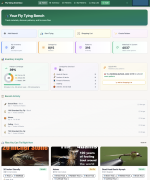
 Track what you own — log your dubbing, hooks, thread, hackle, feathers, everything. Add colors, sizes, quantities, even snap a photo
 See what you can tie — the app matches your inventory against 300+ patterns and tells you which flies you can tie right now, which you're one material away from, and what you need to buy
 Browse 300+ patterns — full step-by-step tying instructions with materials lists and video tutorials. Browse without signing up → (https://www.flytyinginventory.com/explore)
 Smart shopping list — knows exactly what you're missing and where to get it
I've been using it with a small group of tyers and the feedback has been great. Would love to hear what the PNW community thinks — especially what materials or local patterns you'd want to see added.
flytyinginventory.com (https://www.flytyinginventory.com)


 Smarter pattern matching — the app now considers 264 material substitutions, so if you have turkey biots instead of pheasant tail fibers, it still counts
 Substitution badges — pattern cards now show when subs from your inventory can unlock a pattern you thought you couldn't tie
 Getting Started checklist — a progress tracker on your dashboard so you always know what to do next
 Contextual help links — "Need help?" links throughout the app point you to the right guide section
 Better search engine visibility — all 316+ pattern pages now fully render for Google so you can find them by searching "how to tie [pattern name]"
 Accessibility improvements — keyboard navigation and screen reader support for dialogs
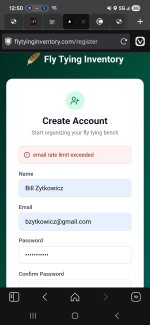
 Registration & email confirmation A few of you said the confirmation email never showed up, took forever, or dropped you on a broken page. That whole flow has been rebuilt:
 From a pattern straight to your inventory or shopping list When you're looking at a fly pattern's materials list, every row now has a one-click button to either send a missing material to your shopping list or mark it as something you already have and add it to your inventory. There's a mode toggle at the top of the list, plus an "Add all missing" button to handle the whole pattern in one click.
 In-app feedback No more chasing me down on a forum (though I do love it). There's now a "Send feedback" link in the nav and a /feedback page where you can drop a bug report or feature request from inside the app — including anonymously if you'd rather.
 Bonus — barcode scanner The barcode scanner also got an upgrade recently. It now uses a lookup source with a much higher hit rate on fly tying brands, so scanning a spool of thread or a pack of hooks usually just works.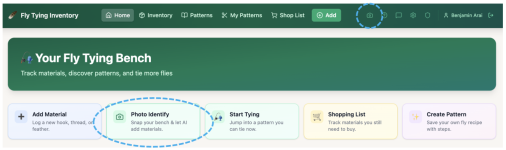
 Desktop — homepage Quick Actions row, or the camera icon up in the header (works from any page)
 Phone / tablet — same spots, plus a floating camera button bottom-right of the screen. Honestly, mobile is where it shines.
 /
/  each match so we know what's working
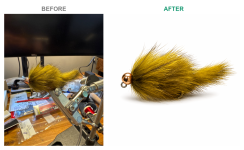
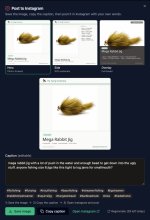
 Clean up your pattern photos with AI: When you add a photo to a pattern, you'll now see a "Clean up with AI" button. One click isolates the fly — dropping the vise, background, hands, tools, and harsh shadows — recenters it in a clean square frame on a soft white background, and gives it a subtle product-portrait polish. It stays faithful to your fly: same hook, proportions, materials, and colors. You get a side-by-side before/after, and you can revert to your original anytime.