Posting pictures

iveofione

Legend
Forum Supporter
Is it possible to post pictures on here from an android phone? I have both an android phone and Chromebook and am very pleased with both-especially the Chromebook but I have never figured out how to seamlessly post pictures. The present procedure is to send a picture to Freestone on my phone and have her post it instantly from her Iphone! I don't want to bother her with that and would like to figure this out for myself.

If this is doable and you can walk me through it I would certainly appreciate the help.
 
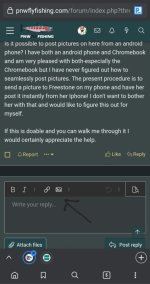
Same process as doing it in a laptop/desktop web browser. Click that photo icon in the message box and navigate to the photo you'd like within your phone's storage.

Screenshot_20220302-094459_Presearch.jpg
 
Well, I was afraid of this-either you don't understand the question or I don't understand the answer. I'm betting on the latter. It seems like there must be several steps from taking the picture to opening a thread on here where it can be posted. And it it seems like I am hearing the last step but the interim steps are absent to me. What I'm trying to find out is what happens after I take the picture to get it to where I can post it. I used to do it when I used Windows but have never really figured it out with my Chromebooks. If you are using Windows or something similar there is probably little help you can give, I need to talk to someone conversant in android that is posting pictures successfully. Telling me how to do it with an I-Phone just isn't germane.

Bear in mind that 8 year olds know more about this stuff than I do.
 
Well, I was afraid of this-either you don't understand the question or I don't understand the answer. I'm betting on the latter. It seems like there must be several steps from taking the picture to opening a thread on here where it can be posted. And it it seems like I am hearing the last step but the interim steps are absent to me. What I'm trying to find out is what happens after I take the picture to get it to where I can post it. I used to do it when I used Windows but have never really figured it out with my Chromebooks. If you are using Windows or something similar there is probably little help you can give, I need to talk to someone conversant in android that is posting pictures successfully. Telling me how to do it with an I-Phone just isn't germane.

Bear in mind that 8 year olds know more about this stuff than I do.
The screenshot I posted was from my Android phone.

1. Take the photo, which will automatically save to your phone's "gallery."
2. Click the attach file, or photo icon I pointed to in my post up above.
3. This will open up your phone's gallery, or latest photos, depending on local settings.
4. Find the photo you just took, or are looking for in your phone's gallery, click on it, and it will upload here.
 
Or is your question how to post from your Chromebook a photo that exists on your Android phone?
 
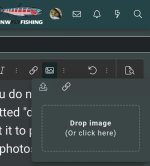
You do need to click inside the dotted "drop image" box to get it to pull up your gallery of photos - where it says "or click here"
Screenshot_20220302-132809_Chrome.jpg
 
Or is your question how to post from your Chromebook a photo that exists on your Android phone?
Yes, that is what I am hoping to do. It sounds like you all have PNWFF on your phones and just work from that. How do I do that?
 
Yes, that is what I am hoping to do. It sounds like you all have PNWFF on your phones and just work from that. How do I do that?
No I mostly post from a computer. So we need to work on getting your phone photos to your computer. The way I do it is to sign up for Dropbox, and have my phone automatically sync my photos to dropbox, which automatically puts them on my computer. If you're unable to figure out how to set up Dropbox or another cloud service, then emailing them to yourself can work as well. Just more steps.
 
Yes, that is what I am hoping to do. It sounds like you all have PNWFF on your phones and just work from that. How do I do that?

Oh! You mean you don't have the forum on your phone at all yet!
Just type
pnwflyfishing.com
into Google on your phone and sign in
 
Once you get it on your phone, then save it as a bookmark so you don’t have to search for it every time.
SF
 
It worked! And it was damned easy, thanks for the help and guidance!

The bread is from one of my bread making students in Vancouver made a couple of weeks ago. It is her first loaf using the stretch and fold method and was nearly perfect!

And again-thanks all for the help and suggestions!
 
It's super easy. Hell if I can do it, you sure could do it.
Oh! You mean you don't have the forum on your phone at all yet!
Just type
pnwflyfishing.com
into Google on your phone and sign in
I have a smart phone, but I do all I do with my lap top. I could put the web site on my smart phone. But to type things the damn keys are to damn small. Lots of mistakes on my end.
 
It worked! And it was damned easy, thanks for the help and guidance!
Now that you have that mastered, can you figure out how to text me that fine-looking loaf of bread, Ive? ;)
 
Yes, that is what I am hoping to do. It sounds like you all have PNWFF on your phones and just work from that. How do I do that?
I don't have a PNWFF app on my android phone. I just use the Chrome web browser on my phone to navigate to the website. then I post a reply and near the bottom of where I am typing my reply there is an "attach files" button. when I click that, it opens a selection screen on my phone and I can click through a couple of folders until I get to my camera photos. then I select the photo I want. Then I click on the "attach files" button again and select "attach full image." Or maybe it bis "insert full image."

I have a much easier time uploading phots directly from my phone than trying to transfer the photos to my computer and uploading from the computer.

Hope that helps!
 
Back
Top