
Navigation
Install the app
How to install the app on iOS
Follow along with the video below to see how to install our site as a web app on your home screen.
Note: This feature may not be available in some browsers.
More options
Style variation
You are using an out of date browser. It may not display this or other websites correctly.
You should upgrade or use an alternative browser.
You should upgrade or use an alternative browser.
Introducing MyFlyVise.com - BETA Phase
- Thread starter Evan B
- Start date

you can edit and put the info in the module. There's no feature to scan the post and auto do it. I did try that, but it's super buggy and not worth the trouble at the moment. So edit, use the MFV button, fill the info in on that, submit.Along those lines. Anyway to find an old post, hit edit and push to the new site from the edit window? Or can you only push a new post to the new site.
If possible, something like that might motivate some folks to push older posts of theirs over.
I'm about to start my daily session of PNWFF/MFV/PNWF programming work here. Should hopefully have the forum post button fixed so it does it all in one shot from this page.I just submitted a fly on MFV, then created a What's in Your Vise post with just the name of the fly, and copied the MFV link below the fly name in the What's in Your Vise thread. Worked like a charm!

That will be great! Thank you for your work on this. It will be very nice to have a searchable database of cool new to me flies to try.I'm about to start my daily session of PNWFF/MFV/PNWF programming work here. Should hopefully have the forum post button fixed so it does it all in one shot from this page.

you can edit and put the info in the module. There's no feature to scan the post and auto do it. I did try that, but it's super buggy and not worth the trouble at the moment. So edit, use the MFV button, fill the info in on that, submit.
Got it. I edited an old one of mine and figured I’d have to fill in the info but it did not pull the photo either. I was hoping it would automatically pull the photo from here so I would not have to dig through my phone to find it. Thinking about it more though, it might be easier to dig through phone photos than the whole what’s in your vice thread so maybe much of a time saver anyway.
Hah. Honestly, I MIGHT be able to pull a photo into the thing. Let me try that once I fix the other stuff that's broken (current situation).Got it. I edited an old one of mine and figured I’d have to fill in the info but it did not pull the photo either. I was hoping it would automatically pull the photo from here so I would not have to dig through my phone to find it. Thinking about it more though, it might be easier to dig through phone photos than the whole what’s in your vice thread so maybe much of a time saver anyway.
GUYS THIS IS HUGE! I NEED YOU TO TEST THIS
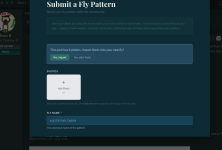
Ok so what you're looking at here: If you have an old post with a fly you tied, you can go to that post, click "edit," click the MyFlyVise button on the toolbar, and it will import your photos for you. No need to re-download, find them in your phone, etc etc.
Ok so what you're looking at here: If you have an old post with a fly you tied, you can go to that post, click "edit," click the MyFlyVise button on the toolbar, and it will import your photos for you. No need to re-download, find them in your phone, etc etc.

It works! I'm on Chrome my phone. I had to click Edit and then saw the MyVise icon. Nice work!
GUYS THIS IS HUGE! I NEED YOU TO TEST THIS
View attachment 182698
Ok so what you're looking at here: If you have an old post with a fly you tied, you can go to that post, click "edit," click the MyFlyVise button on the toolbar, and it will import your photos for you. No need to re-download, find them in your phone, etc etc.
It works great! I like that the MFV link appears automatically in the WIMV post.GUYS THIS IS HUGE! I NEED YOU TO TEST THIS
View attachment 182698
Ok so what you're looking at here: If you have an old post with a fly you tied, you can go to that post, click "edit," click the MyFlyVise button on the toolbar, and it will import your photos for you. No need to re-download, find them in your phone, etc etc.

@CanoeGuy - I took a lot of what you said about entering the materials and made some updates. End result is the same, but you no longer have to click on the dropdown.
Type in with commas, no clicking the list.
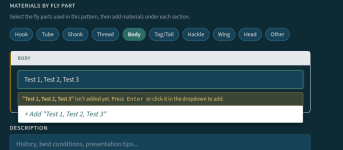
back end separates values by comma and saves attribute normally as if you had clicked in the list
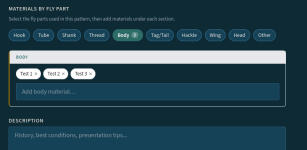
Type in with commas, no clicking the list.
back end separates values by comma and saves attribute normally as if you had clicked in the list



I signed up today and received the verify email and verified
i'm logged in and used the button in my pnw post and got the above message
????
Last edited:
Things are still new so running into a few things I need to fix. I'll check the error logs - but every one of these reports shows me something to fix. Appreciate the heads up!View attachment 182742
View attachment 182743
I signed up today and received the verify email and verified
i'm logged in and used the button in my pnw post and got the above message
????
Edit: Was an easy fix. It's up and working again.
Last edited:
Added on to the feed - should come in handy as more flies get submitted. Easier to understand navigation on the left-hand side, and made it so the flies get categorized in the feed by species/fly type when using Custom Feed.
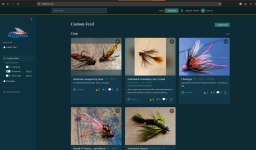
And got this here rolled out, too.
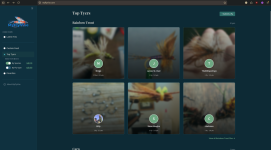
And got this here rolled out, too.
Last edited:
I did want to point out that the "Upvoting" and "Favorite" on flies gives them an overall score that is weighted in the feed, searches, etc. So those aren't just for decoration. It's a way to hopefully help bring the favorite flies to the front and center when they're looked for.
Ability to embed a video has been added. We can't host them ourselves yet, so am using Vimeo/Youtube for now.Oh, and I did mean to ask (I am guessing this has to do with host server size?). I have a lot of video shorts I do on tying my patterns. I can't post them here, and doesn't look like there is any way to post them on MyFlyVise.
I'd love to share them with everyone, any possibility of that in the future?