Cellphones on the water - tips thread!

Northern

Seeking SMB
Forum Supporter
I like to use my phone for pics while fishing, and have learned a couple lessons over the years, so thought I'd share. Please add any tips of your own to this thread!

--> Either turn off location permissions for your camera altogether, or remove it from any pics you post

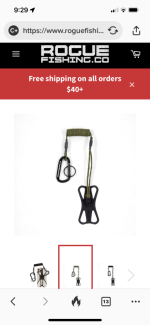
--> I highly recommend a phone tether! It's saved mine from going in the drink more than once.

This type is easy and cheap if you have a case on your phone.
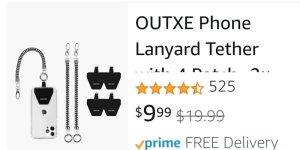
Screenshot_20220314-224401_Amazon Shopping.jpgThe patch slips between the back of the phone and the case, with a slender ribbon & ring hanging thru the charge port opening.
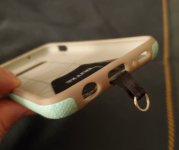
20220314_223938.jpgI put a small carabiner thru the large tether ring on the spring cord to attach to my life vest, and clip the small existing clasp to the phone. While in the yak, the phone then resides in my chest pocket. On my Samsung, the ribbon doesn't block the charge cord at all, so I just leave it on all the time.

--> Popsockets make holding and using a phone one-handed with frozen fingers much easier, and also serve as a phone stand if you want to set it down for a selfie.

--> Speaking of selfies...I've seen in a couple different threads where folks were wondering how Billy takes such nice ones with his fish.
If you don't know how to remote activate your camera, here's how: (This is for Android, but I assume iPhones have something similar)

Open camera app, go to Settings (cog thingy), scroll down to Shooting Methods, open. Turn on Voice Commands. (You can leave this on. It works in both forward and selfie camera mode, though, so if you have your camera open and happen to say "shoot", it will take a pic!)

When you want to take a photo, put the camera in selfie mode, position phone somewhere secure (a rock, stump, boat seat, etc) with screen toward you and so you can see yourself in the frame. (If you have a tether, you can secure it to something nearby so it doesn't slither off the boat seat, bounce off the cooler, and swan dive into the lake)

Lift your fish out of the water and say "shoot"- a little counter will show you the 2 sec countdown to the shutter click.

(Personally, I think my fish look better without me in the shot 🤪 )

Anyone else have tips?
Has anyone used any of the clip-on lenses?
 
I have an S8 Active with a thin flexible case with grips on the edges. They said it can be dropped and dunked and I've done both. The little rivers I fish are not too deep, and I've retrieved it from elbow depth several times. Never had an issue being wet. Been dropped on the rocks as well and it's fine. I got a neat routine from my vest pocket, 2 pushes of on and the camera activates, then hit the white button. Takes a couple seconds, and by then a fish has usually rubbed the barbless hook out. If it's deep, uncomfortable or heavy current it just stays in my pocket. I can set a 5-10 second delay of the selfie camera, I need to look at the voice activate, that would be cool.
I like the leash idea, the few times I've been out in the float tube with it I've hardly taken a picture, too nervous about loosing it in the depths.
 
Good call on the leash. I probably should get one. I take the vast majority of my pictures with my phone and apparently like to live dangerously.
 
Last edited:
Gonna need to get that tether. I use a life proof case and it has shown its mettle many times. Last June it was on the bottom of the silty nooksack in knee deep for what felt like eternity. When I finally found it via braille it was totally fine. Submerged for several minutes.

Sometimes I surprise toss it at iPhone users or toss it against a wall to freak them out. My phone is 5 years old and the actual phone has not a single scuff or crack. Highly recommend.
 
apparently like to live vicariously.
Not sure that's right. I enjoy living vicariously through your photos and those of others. Not sure that's the right word for those of us without a leash. I know there's another similar word for living dangerously but I'm not sure thats right. I don't why I'm doing this, I can't write or spell, math is my skillset.
 
Last edited:
Not sure that's right. I enjoy living vicariously through your photos and those of other. Not sure that's the right word for us without a leash. I know there's another similar word for living dangerously but I'm not sure thats right. I don't why I'm doing this, I can't write or spell, math is my skillset.
yeah, I know it's not right, but I still wrote it...knowing it wasn't right. lol

I should just change it to dangerously...just looked up synonyms and none really fit.

edit: fine, I fixed it for you....:LOL:
 
Last edited:
I put every new phone in a LifeProof (submersible) case the second I get one and it lives there 24/7. You never know when you will be around water - even if just the toilet, LOL! Even though my phone is now supposedly waterproof, I’ve read the fine print so I don’t totally trust it. I also always keep a tether on it and even during a normal day, I clip it to my belt loop. Almost 10 years ago, I had a rare nearly fatal disease disease that amount much worse symptoms, also caused me to drop things. The tethered saved my phone countless times so it is habit now.

@Pink Nighty LifeProof cases have a built-in place to attach a lanyard so the product above is redundant. Facing the phone screen, look at the bottom right corner.
 
I put every new phone in a LifeProof (submersible) case the second I get one and it lives there 24/7. You never know when you will be around water - even if just the toilet, LOL! Even though my phone is now supposedly waterproof, I’ve read the fine print so I don’t totally trust it. I also always keep a tether on it and even during a normal day, I clip it to my belt loop. Almost 10 years ago, I had a rare nearly fatal disease disease that amount much worse symptoms, also caused me to drop things. The tethered saved my phone countless times so it is habit now.

@Pink Nighty LifeProof cases have a built-in place to attach a lanyard so the product above is redundant. Facing the phone screen, look at the bottom right corner.
Thank you for the heads up! I feel silly
 
I like the lanyard thing very much and been using one for years, tethered to my waders. I leave the lanyard permanently on the waders.
I toasted an iphone 6 with a slip on the rocks and got it wet beyond fixing a few years ago. Newer phones are waterproof and the only way to go if around water.
 
I like to use my phone for pics while fishing, and have learned a couple lessons over the years, so thought I'd share. Please add any tips of your own to this thread!

--> Either turn off location permissions for your camera altogether, or remove it from any pics you post

--> I highly recommend a phone tether! It's saved mine from going in the drink more than once.

This type is easy and cheap if you have a case on your phone.
View attachment 8745The patch slips between the back of the phone and the case, with a slender ribbon & ring hanging thru the charge port opening.
View attachment 8746I put a small carabiner thru the large tether ring on the spring cord to attach to my life vest, and clip the small existing clasp to the phone. While in the yak, the phone then resides in my chest pocket. On my Samsung, the ribbon doesn't block the charge cord at all, so I just leave it on all the time.

--> Popsockets make holding and using a phone one-handed with frozen fingers much easier, and also serve as a phone stand if you want to set it down for a selfie.

--> Speaking of selfies...I've seen in a couple different threads where folks were wondering how Billy takes such nice ones with his fish.
If you don't know how to remote activate your camera, here's how: (This is for Android, but I assume iPhones have something similar)

Open camera app, go to Settings (cog thingy), scroll down to Shooting Methods, open. Turn on Voice Commands. (You can leave this on. It works in both forward and selfie camera mode, though, so if you have your camera open and happen to say "shoot", it will take a pic!)

When you want to take a photo, put the camera in selfie mode, position phone somewhere secure (a rock, stump, boat seat, etc) with screen toward you and so you can see yourself in the frame. (If you have a tether, you can secure it to something nearby so it doesn't slither off the boat seat, bounce off the cooler, and swan dive into the lake)

Lift your fish out of the water and say "shoot"- a little counter will show you the 2 sec countdown to the shutter click.

(Personally, I think my fish look better without me in the shot 🤪 )

Anyone else have tips?
Has anyone used any of the clip-on lenses?
Great tips Leigh. I know it's a matter of time before my phone takes a dunking.....again😆
 
I'm more concerned about impact protection than water protection, with my phone. A broken screen on a $1,000+ phone is going to ruin my week and be a huge pain in the ass to sort out. I couldn't find a good solution to that problem, so I went a different route.

I got a cheap waterproof camera, from Costco. It was about $100. It came with a lanyard, which I keep attached to one of my wader straps. I just let the camera hang down inside my waders. I find this much better than messing around with my phone and the photos are better.
 
Last edited:
I got a cheap waterproof camera, from Costco. It was about $100. It came with a lanyard, which I keep attached to one of my wader straps. I just let the camera hang down inside my waders. I find this much better than messing around with my phone and the photos are better.
I like to torture my fishing partner by sending fish pics in real time while she's at home 😁

Plus, the pics on my phone serve as my fishing notebook
 
I just learned how to take pictures on my Iphone a couple days ago because the battery in my camera died. Somehow I don't think I'll make a habit of it though, taking pictures with my phone. Hah!
 
I'm more concerned about impact protection than water protection, with my phone. A broken screen on a $1,000+ phone is going to ruin my week and be a huge pain in the ass to sort out. I couldn't find a good solution to that problem, so I went a different route.

I got a cheap waterproof camera, from Costco. It was about $100. It came with a lanyard, which I keep attached to one of my wader straps. I just let the camera hang down inside my waders. I find this much better than messing around with my phone and the photos are better.
Sounds like a good call. None of my overall landscape photo's (anything at distance) are as nice as one's shot with a real camera, that's what has me thinking of a decent camera.
 
I'm more concerned about impact protection than water protection, with my phone. A broken screen on a $1,000+ phone is going to ruin my week and be a huge pain in the ass to sort out. I couldn't find a good solution to that problem, so I went a different route.

I got a cheap waterproof camera, from Costco. It was about $100. It came with a lanyard, which I keep attached to one of my wader straps. I just let the camera hang down inside my waders. I find this much better than messing around with my phone and the photos are better.
Have you tried life proof cases? Lots of advantages to the camera and all but I can throw my phone facedown on concrete and it does nothing to it. And they replace the cases for life.
 
I put every new phone in a LifeProof (submersible) case the second I get one and it lives there 24/7. You never know when you will be around water - even if just the toilet, LOL! Even though my phone is now supposedly waterproof, I’ve read the fine print so I don’t totally trust it. I also always keep a tether on it and even during a normal day, I clip it to my belt loop. Almost 10 years ago, I had a rare nearly fatal disease disease that amount much worse symptoms, also caused me to drop things. The tethered saved my phone countless times so it is habit now.

@Pink Nighty LifeProof cases have a built-in place to attach a lanyard so the product above is redundant. Facing the phone screen, look at the bottom right corner.
Which LifeProof case do you use?
 
Back
Top