USGS ''New Website" assistance

kmudgn

Life of the Party
I am looking for assistance with the revamped USGS streamflow website. I can't figure out how to save sites I have selected as favorites. If I check the box to select the sites I want to list as favorites, they are not saved as the next time I go to the site none are listed. Does anyone have any insight as to how to get the favorites into a permanent save list
Thanks
 
Yes the individual sites can sometimes take a several clicks to find what I'm looking for. I save the state map page as a favorite in my browser.
I click a station I want to designate as a favorite.
I check the Select for My Favorite box. That changes the color of the station dot to find them more easily on the state map.
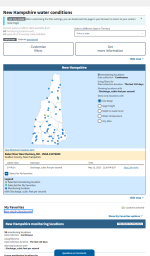
1747156537810.png
I click on the My Favorites link to display the Favorites page and save as it a favorite in the browser.
Next I click on Graph Favorites and it will display my Favorites in a table with the links.
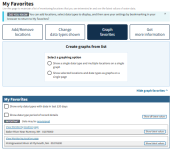
1747156928385.png
Clicking on a link takes me to that river's favorite page. I also save that page as a favorite in my browser.
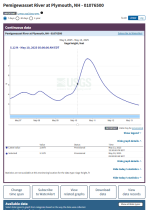
1747157202744.png
Note the Subscribe to WaterAlert button. I log CFS every time I fish and over the decades have been able to determine what CFS levels are optimal for me (water clarity, safe to wade, reach known lies...)
1747157535703.png
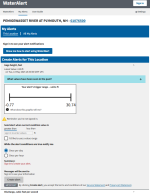
I create a login account where I enter my email address
I input my highest CFS level.
I leave the default alert condition at Once per day
Then early in the season I will get an email(s) when the water level drops to where my observations have shown conditions are favorable for me.

Hope that helps.

 
Last edited:
Sometimes they put in the more complicated type SOFTWARE SYSTEMS because it makes it seem like a more Big Deal type offering. Makes it look like more of a Big Deal type product. Ah I always figure they're pulling in SEVERAL GRAND MORE just because it looks like more of a Big Deal Product now!!!

That's the benefit of making a complicated SOFTWARE INTERFACE!!
 
Thanks,
Its a good thing they did not make it complicated!
I mean, in the previous version you could just spend 30 seconds looking it up
Yeah, that's true but once I bookmark and catalog the individual station webpages I'm interested in it's instantaneous.
 
I just bookmark the individual stations in a browser folder.

Unfortunately, I used the legacy pages for so many years. I find this new page clunky to get to the relatively mundane things I want, and I haven't spent the time to get up to speed, I just default back to the legacy page and get what I want. I guess maybe I need to hang on and figure it out.

Though early on during beta I did comment I thought while comprehensive, the new pages would be clunky and difficult to extract fairly simple info quickly. I guess they didn't care.
 
Back
Top