
Navigation
Install the app
How to install the app on iOS
Follow along with the video below to see how to install our site as a web app on your home screen.
Note: This feature may not be available in some browsers.
More options
Style variation
You are using an out of date browser. It may not display this or other websites correctly.
You should upgrade or use an alternative browser.
You should upgrade or use an alternative browser.
How to “un-ignore” a thread or sub-forum?
- Thread starter Remco
- Start date

The “Camping, Hiking & Cooking” (sub-forum, I think) is labeled “Ignored thread”. I must have inadvertently ignored it somehow. How do I undo my error?
Go to Ignoring here:
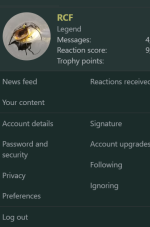
You can Unignore stuff there...


Up at the top of your screen, you'll find your circular red avatar with the "R" in it.
That's the link for your account profile. Click or press on that.
Near the bottom of your account profile display screen, you'll find "Ignoring" & "Following" links.
Click or Press on "Ignoring"
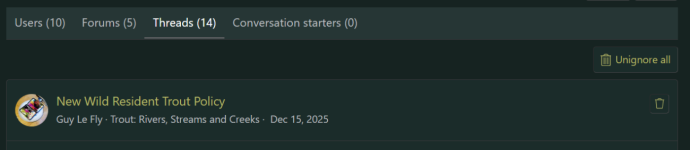
Forums and Threads have a Trash Can.
(Users - Members have an UnIgnore button.)
Press the trash can on the items you want to see again.
That's the link for your account profile. Click or press on that.
Near the bottom of your account profile display screen, you'll find "Ignoring" & "Following" links.
Click or Press on "Ignoring"
Forums and Threads have a Trash Can.
(Users - Members have an UnIgnore button.)
Press the trash can on the items you want to see again.